CI/CD Pipeline Explained: Your Essential Guide for Beginners
In the fast-paced world of software development, efficiency and speed are paramount. Developers are constantly seeking ways to deliver high-quality software faster and more reliably. This is where the magic of CI/CD pipelines comes in. If you’ve ever heard terms like “Continuous Integration” and “Continuous Delivery” (or Deployment) and felt a little lost, you’re in the right place. This beginner-friendly guide will break down the CI/CD pipeline, its core concepts, and why it’s become an indispensable tool for modern software teams.
What is a CI/CD Pipeline?
At its heart, a CI/CD pipeline is an automated process that helps software development teams build, test, and deploy their code more frequently and reliably. Think of it as an assembly line for your software. Each stage in the pipeline represents a step in the journey of your code from a developer’s machine to the hands of your users. The goal is to make this journey as smooth, fast, and error-free as possible.
Understanding the Core Components: CI and CD
CI/CD is an acronym that stands for two distinct, yet interconnected, practices:
Continuous Integration (CI)
Continuous Integration is a development practice where developers integrate their code changes into a shared repository (like Git) frequently, ideally multiple times a day. Each integration is then verified by an automated build and automated tests. The primary goal of CI is to prevent integration problems that often arise when teams work in isolation for extended periods.
Key Benefits of CI:
- Early Bug Detection: By integrating and testing code frequently, bugs are caught much earlier in the development cycle, making them easier and cheaper to fix.
- Reduced Integration Hell: Avoids the dreaded “integration hell” where merging code from multiple developers becomes a complex and time-consuming nightmare.
- Improved Code Quality: Automated tests ensure that new code doesn’t break existing functionality.
- Faster Feedback Loops: Developers receive immediate feedback on their code changes, allowing for quicker iterations and improvements.
Continuous Delivery (CD)
Continuous Delivery is an extension of Continuous Integration. It’s a practice where code changes are automatically built, tested, and prepared for release to production. In Continuous Delivery, the release to production is a manual step, but the pipeline ensures that the code is always in a deployable state. This means that at any point, you could decide to release the latest version of your software to your users with confidence.
Continuous Deployment (also CD)
Continuous Deployment goes one step further than Continuous Delivery. In Continuous Deployment, every change that passes all stages of the pipeline is automatically deployed to production. This is the ultimate automation of the release process, allowing for extremely rapid delivery of new features and fixes.
Key Benefits of CD (Delivery/Deployment):
- Faster Time to Market: New features and bug fixes can be delivered to users much more quickly.
- Reduced Risk of Releases: By automating the release process and having robust testing in place, the risk associated with each deployment is significantly reduced.
- Increased Developer Productivity: Developers can focus more on writing code and less on manual deployment tasks.
- More Frequent Releases: Enables teams to release smaller, more manageable updates, which are easier to troubleshoot if issues arise.
The Stages of a CI/CD Pipeline
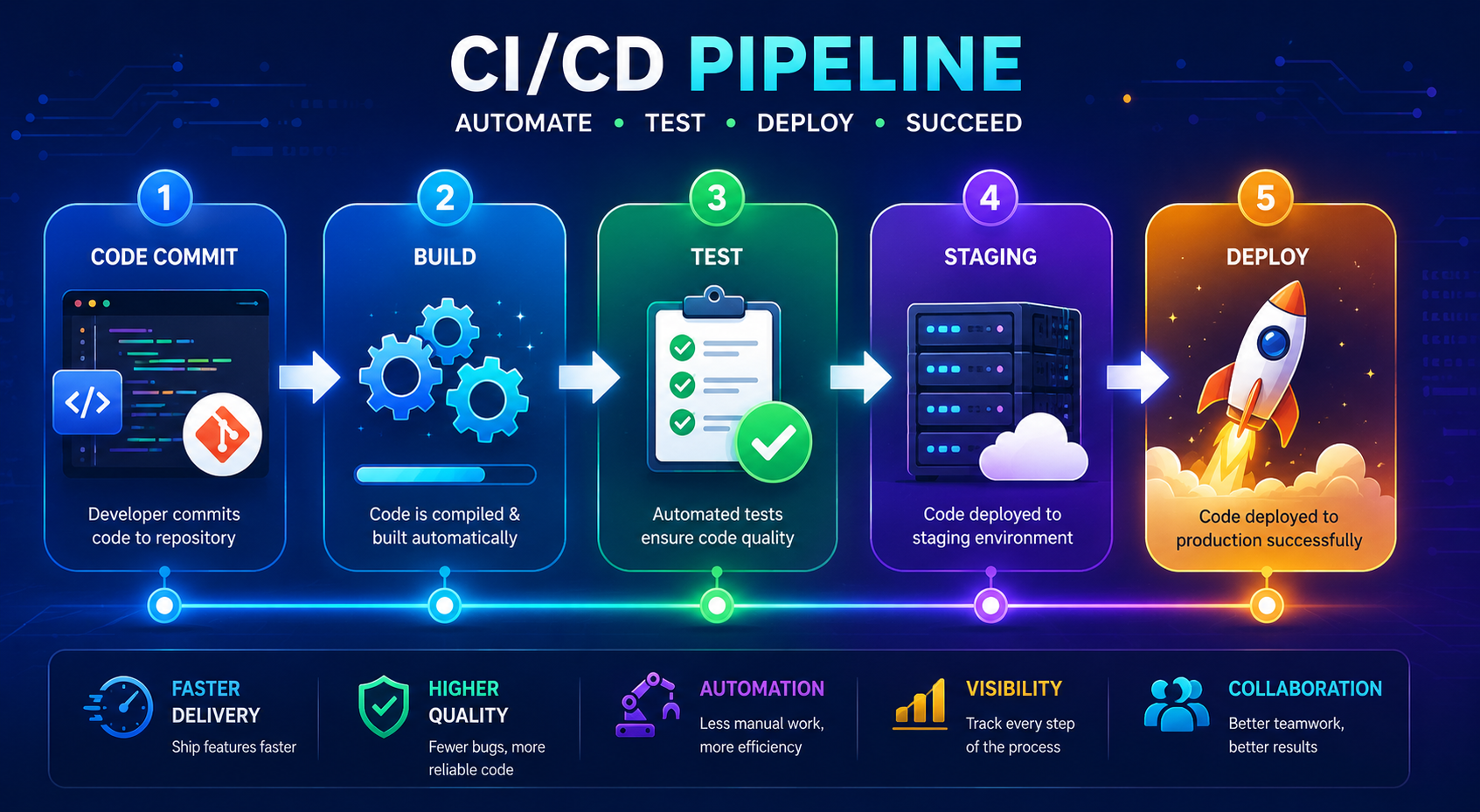
While specific implementations can vary, a typical CI/CD pipeline consists of several key stages:
- Commit/Code: Developers write code and commit it to a version control system (like Git).
- Build: The committed code is automatically compiled and built into an executable artifact. This stage often involves dependency management and package building.
- Test: A comprehensive suite of automated tests is run against the built artifact. This includes unit tests, integration tests, and potentially others like performance or security tests.
- Staging (Optional but Recommended): If configured, the artifact is deployed to a staging environment that closely mirrors the production environment. This allows for final checks and user acceptance testing (UAT) before a live release.
- Deploy/Release: Once all previous stages are successful, the application is deployed to the production environment. In Continuous Delivery, this might be a manual trigger; in Continuous Deployment, it’s automatic.
Why Do We Need CI/CD Pipelines?
In today’s competitive landscape, speed and agility are crucial. CI/CD pipelines are not just a trend; they are a fundamental shift in how software is developed and delivered. Here’s why they are so important:
- Accelerated Development Cycles: By automating repetitive tasks, teams can develop and release software much faster, staying ahead of the competition.
- Improved Software Quality: The emphasis on automated testing at every stage leads to more robust and stable software.
- Enhanced Collaboration: CI/CD fosters a culture of shared responsibility and transparency within development teams.
- Reduced Costs: Catching bugs early and automating deployment reduces the time and resources spent on fixing issues and manual processes.
- Increased Customer Satisfaction: Delivering new features and fixes quickly and reliably leads to happier users.
Getting Started with CI/CD
Embarking on your CI/CD journey might seem daunting, but it can be broken down into manageable steps:
1. Choose Your Tools Wisely
There are many excellent CI/CD tools available, each with its own strengths. Popular choices include:
- Jenkins: A highly extensible open-source automation server.
- GitLab CI/CD: Integrated directly into the GitLab platform, offering a seamless experience.
- GitHub Actions: A powerful automation platform built into GitHub.
- CircleCI: A popular cloud-based CI/CD platform known for its speed and ease of use.
- Travis CI: Another well-known cloud-based CI/CD service, often used for open-source projects.
The best tool for you will depend on your team’s existing tech stack, budget, and specific needs.
2. Version Control is Your Foundation
A robust version control system, like Git, is absolutely essential. Ensure all your code is stored in a centralized repository where CI/CD tools can access it.
3. Automate Your Builds
Start by automating the process of compiling your code and creating an executable artifact. This is the first step in making your pipeline efficient.
4. Implement Automated Testing
Write comprehensive automated tests. Begin with unit tests, which are the most granular, and gradually add integration tests and other types as your confidence grows.
5. Define Your Pipeline Stages
Map out the logical steps your code needs to go through from commit to production. Start simple and iterate. You don’t need to have every possible stage on day one.
6. Integrate and Iterate
Once you have the basics in place, connect your version control system to your CI/CD tool. Configure your pipeline to trigger on code commits. Continuously monitor your pipeline’s performance, identify bottlenecks, and refine your processes.
Common Challenges and How to Overcome Them
While the benefits are clear, implementing CI/CD can present challenges:
- Resistance to Change: Teams might be accustomed to older, manual processes. Emphasize the benefits and provide training.
- Inadequate Testing: Insufficient or poorly written tests will undermine your pipeline’s effectiveness. Invest time in building a strong test suite.
- Complex Infrastructure: Setting up and managing the necessary infrastructure can be challenging. Cloud-based solutions can simplify this.
- Lack of Ownership: Ensure clear roles and responsibilities for maintaining and improving the pipeline.
The Future of CI/CD
CI/CD is not a static concept. As technology evolves, so do CI/CD practices. We are seeing increased emphasis on:
- Shift-Left Security: Integrating security checks earlier in the pipeline.
- AIOps (Artificial Intelligence for IT Operations): Using AI to proactively identify and resolve issues within the pipeline.
- GitOps: Managing infrastructure and application deployments declaratively through Git.
Frequently Asked Questions (FAQ)
What’s the difference between Continuous Delivery and Continuous Deployment?
Continuous Delivery means that your code is always ready to be released to production, but the actual release is a manual decision. Continuous Deployment means that every code change that passes all stages of the pipeline is automatically deployed to production without human intervention.
Is CI/CD only for large companies?
No, absolutely not! CI/CD pipelines are beneficial for teams of all sizes, from solo developers to large enterprises. The scalability and automation provided by CI/CD can help any team deliver software more efficiently.
How long does it take to set up a CI/CD pipeline?
The time it takes can vary greatly depending on the complexity of your project, your team’s existing expertise, and the tools you choose. However, starting with a basic pipeline for a simple project can often be achieved in a matter of days or weeks.
What are the prerequisites for implementing CI/CD?
The most crucial prerequisites are a robust version control system (like Git) and a commitment to automated testing. Without these, your CI/CD pipeline will be significantly less effective.
Do I need to change my entire development workflow?
While CI/CD represents a shift in workflow, it doesn’t necessarily mean a complete overhaul. The goal is to integrate CI/CD practices into your existing workflow to enhance it, not replace it entirely. Small, iterative changes are often the most successful.
Conclusion
CI/CD pipelines are a fundamental pillar of modern software development. By automating the build, test, and deployment processes, teams can deliver higher-quality software faster, more reliably, and with less risk. For beginners, the journey into CI/CD might seem complex, but by understanding the core principles of Continuous Integration and Continuous Delivery/Deployment, choosing the right tools, and starting with a clear, iterative approach, you can unlock significant improvements in your development lifecycle. Embrace the automation, foster collaboration, and watch your software development process transform.