AWS EC2 vs AWS Lambda: Navigating Your Cloud Compute Choice
The cloud computing landscape offers a dazzling array of services, each designed to solve specific problems. For developers and businesses embarking on their cloud journey, one of the most fundamental decisions involves choosing the right compute service. Two titans in the Amazon Web Services (AWS) ecosystem for running your applications are Amazon Elastic Compute Cloud (EC2) and AWS Lambda. While both allow you to run code in the cloud, they operate on fundamentally different principles and cater to distinct use cases. Understanding these differences is crucial for building cost-effective, scalable, and performant applications. This guide will break down EC2 and Lambda, explore their strengths and weaknesses, and help you determine which one is the best fit for your needs.
Understanding the Core Concepts: Servers vs. Functions
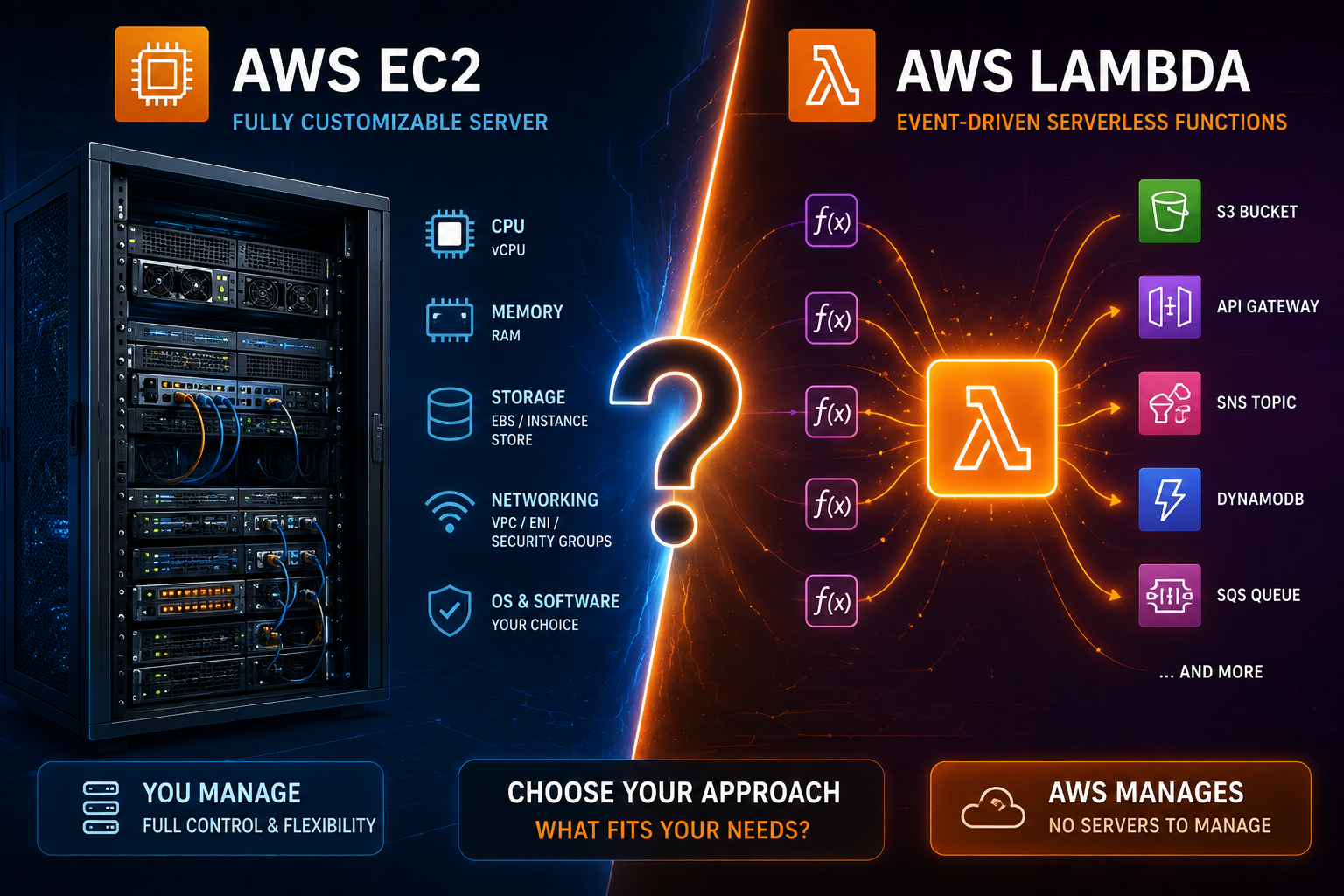
At its heart, the distinction between EC2 and Lambda boils down to a difference in abstraction. Imagine you need to cook a meal. With EC2, you’re essentially renting a kitchen (a virtual server). You have full control over the kitchen’s layout, the appliances you use, and how you prepare your ingredients. You are responsible for setting up the stove, the oven, cleaning up, and ensuring everything is operational. Lambda, on the other hand, is more like ordering a meal from a catering service. You provide the recipe (your code), and the catering service handles all the underlying infrastructure – the kitchen, the chefs, the cleanup. You only pay for the specific meal you order and the time it takes to prepare it.
Amazon EC2: The Virtual Server Powerhouse
Amazon EC2 provides virtual servers in the cloud, often referred to as instances. When you launch an EC2 instance, you are essentially provisioning a virtual machine that you can configure and manage just like a physical server. You choose the operating system (Linux, Windows), the processing power (CPU), memory (RAM), storage, and networking capabilities. This level of control makes EC2 incredibly flexible and suitable for a wide range of applications.
Key Characteristics of AWS EC2:
- Infrastructure as a Service (IaaS): EC2 falls under the IaaS model, meaning AWS provides the foundational infrastructure, and you manage the operating system, middleware, and applications.
- Always On: EC2 instances are typically designed to run continuously, making them ideal for long-running applications, web servers, databases, and any service that needs to be constantly available.
- Full Control: You have root access to your EC2 instances, allowing you to install any software, configure network settings, and customize the environment to your exact specifications.
- Scalability: EC2 instances can be scaled both vertically (by choosing larger instance types) and horizontally (by launching more instances and using load balancers).
- Stateful Applications: EC2 is well-suited for applications that need to maintain state, such as traditional web applications, databases, and file servers.
Common Use Cases for AWS EC2:
- Hosting traditional web applications and websites.
- Running relational databases (e.g., MySQL, PostgreSQL).
- Deploying enterprise applications.
- Setting up virtual desktops.
- Batch processing and high-performance computing.
- Running containerized applications (though services like ECS and EKS are often preferred for this).
AWS Lambda: The Serverless Function Challenger
AWS Lambda is a serverless compute service. This means you don’t provision or manage any servers. Instead, you upload your code as functions, and Lambda runs that code in response to events. These events can be triggered by a wide variety of sources, including changes in AWS services (like a file being uploaded to S3), incoming API requests, scheduled events, or even custom events from your applications.
Key Characteristics of AWS Lambda:
- Functions as a Service (FaaS): Lambda is the epitome of FaaS. You focus solely on writing and deploying your code snippets (functions).
- Event-Driven: Lambda functions are designed to execute in response to specific events. They are not meant to be constantly running.
- Automatic Scaling: Lambda automatically scales your application by running code in response to each trigger. It can scale from a few requests per day to thousands per second.
- Pay-per-Execution: You are billed based on the number of requests for your functions and the duration of their execution. If your function isn’t running, you aren’t paying for compute time.
- Stateless by Design: Lambda functions are inherently stateless. While you can use external services like databases or S3 to store state, the function itself does not retain state between invocations.
Common Use Cases for AWS Lambda:
- Processing data from services like Amazon S3 or Kinesis.
- Building APIs with Amazon API Gateway.
- Responding to changes in databases (e.g., DynamoDB Streams).
- Performing scheduled tasks.
- Automating IT tasks and responding to AWS service events.
- Real-time file processing.
- Mobile backends.
Key Differentiating Factors: A Deeper Dive
Now that we have a foundational understanding of both services, let’s dive into the key differentiating factors that will influence your decision.
Control vs. Simplicity
The most significant differentiator is the level of control. EC2 offers granular control over the entire compute environment. This is a double-edged sword. While it provides immense flexibility, it also comes with the responsibility of managing operating systems, security patching, software updates, and server maintenance. Lambda, on the other hand, abstracts away all of this infrastructure management. You simply upload your code, and AWS handles the rest. This simplicity allows developers to focus on writing business logic rather than managing servers.
Pricing Models: Always On vs. Per Execution
The pricing models are as different as the services themselves.
- EC2: You pay for the EC2 instances you launch, typically on an hourly or per-second basis, regardless of whether they are actively processing requests. You also pay for associated costs like EBS storage, Elastic IP addresses, and data transfer. You can opt for On-Demand instances, Reserved Instances (for cost savings on long-term commitments), or Spot Instances (for significant cost savings on spare capacity).
- Lambda: You pay for the number of requests your functions receive and the duration for which your code executes, measured in milliseconds. There’s also a free tier that generously covers a significant number of requests and compute time. This pay-per-execution model can be incredibly cost-effective for applications with variable or infrequent workloads.
When is EC2 more cost-effective? For applications with predictable, constant high-throughput workloads that run 24/7, EC2 might be more cost-effective due to the ability to reserve instances at discounted rates.
When is Lambda more cost-effective? For applications with spiky traffic, infrequent tasks, or event-driven workloads, Lambda’s pay-per-execution model is often significantly cheaper.
Scalability: Manual vs. Automatic
Both services offer scalability, but the approach differs.
- EC2: Scaling EC2 typically involves configuring Auto Scaling groups. You define rules for when to launch or terminate instances based on metrics like CPU utilization or network traffic. While automated, it requires setup and configuration.
- Lambda: Lambda’s scaling is inherent and automatic. AWS automatically scales your functions to handle the incoming load. You don’t need to configure anything; Lambda manages the provisioning and de-provisioning of resources behind the scenes.
Execution Duration and State Management
Another crucial difference lies in how long functions can run and how they handle state.
- EC2: Instances can run for indefinite periods, making them suitable for long-running processes. Applications running on EC2 can easily maintain state within the instance itself.
- Lambda: Lambda functions have a maximum execution duration, currently set at 15 minutes. This is a fundamental constraint that means Lambda is not suitable for long-running tasks like large data processing jobs or persistent server processes. As mentioned, Lambda functions are stateless. If your application requires state, you’ll need to leverage external services like Amazon RDS, DynamoDB, or ElastiCache.
Cold Starts: A Consideration for Lambda
A phenomenon unique to Lambda (and other serverless functions) is the “cold start.” When a Lambda function hasn’t been invoked for a while, AWS needs to provision a new execution environment for it. This process can introduce a slight delay (typically a few milliseconds to a couple of seconds) before the function actually begins executing its code. For applications that require extremely low latency and cannot tolerate even a small delay, this cold start can be a concern. AWS offers strategies like Provisioned Concurrency to mitigate cold starts for critical functions, though this incurs additional costs.
Choosing the Right Service: A Decision Matrix
To help you make the right choice, consider these questions:
- What is the nature of your workload? Is it a continuous, long-running application, or is it event-driven and sporadic?
- How much control do you need over the underlying infrastructure? Do you need to install custom software, manage operating systems, or fine-tune server configurations?
- What is your budget? Are you looking for predictable monthly costs, or can you benefit from a pay-per-execution model?
- What are your latency requirements? Can your application tolerate occasional slight delays from cold starts?
- What is your team’s expertise? Does your team have experience managing servers, or would they prefer a serverless paradigm?
When to Choose AWS EC2:
- You need complete control over the server environment.
- You are running traditional, long-running applications like web servers or databases.
- Your application requires specific operating system configurations or custom software installations.
- Your workload is consistently high and predictable, allowing for cost optimization with Reserved Instances.
- You are migrating existing on-premises applications to the cloud with minimal changes.
When to Choose AWS Lambda:
- Your application is event-driven and responds to specific triggers.
- You want to minimize infrastructure management overhead.
- Your workload is variable, spiky, or has periods of inactivity.
- You need to build microservices or APIs that scale automatically.
- Cost-effectiveness for infrequent or unpredictable tasks is a priority.
- You are building new applications and want to leverage modern cloud-native architectures.
Hybrid Approaches and Modern Architectures
It’s important to note that EC2 and Lambda are not mutually exclusive. Many modern cloud architectures leverage a hybrid approach. For instance, you might use Lambda functions to handle quick, event-driven tasks like image resizing upon upload to S3, while running a more complex, stateful application or database on EC2 instances. You could also use EC2 instances to host container orchestration platforms like Amazon EKS or ECS, and then deploy containerized microservices that can be triggered by Lambda functions.
Furthermore, the rise of containers has introduced another layer of consideration. Services like AWS Fargate offer a serverless container experience, abstracting away the underlying EC2 instances needed to run containers. This can be a compelling middle ground for certain workloads.
Frequently Asked Questions (FAQ)
Q1: Can I run a stateful application on AWS Lambda?
AWS Lambda functions are designed to be stateless. You must use external services like databases (e.g., Amazon RDS, DynamoDB) or caching services (e.g., ElastiCache) to manage state for your Lambda functions.
Q2: What are the maximum execution times for EC2 and Lambda?
EC2 instances can run indefinitely as long as they are active. AWS Lambda functions have a maximum execution duration of 15 minutes.
Q3: How does pricing differ significantly between EC2 and Lambda?
EC2 charges are typically based on the instance type and duration it’s running (hourly/per-second), plus associated storage and data transfer. Lambda charges are based on the number of requests and the compute time (in milliseconds) your functions execute. If your application has sporadic usage, Lambda is often more cost-effective. For constant, high-demand workloads, EC2 with reserved instances might be cheaper.
Q4: What is a “cold start” in AWS Lambda?
A cold start occurs when a Lambda function hasn’t been invoked recently, and AWS needs to initialize a new execution environment before running your code. This can add a small delay to the first invocation.
Q5: When should I consider using AWS Fargate instead of EC2 or Lambda?
AWS Fargate provides a serverless compute engine for containers. It’s a good choice if you want to run containerized applications without managing the underlying EC2 instances, but your application doesn’t fit the event-driven, short-lived model of Lambda.
Conclusion
The choice between AWS EC2 and AWS Lambda is a pivotal decision that will shape your application’s architecture, cost, and operational overhead. AWS EC2 remains a powerful and flexible option for those who require deep control over their infrastructure, need to run long-standing applications, or are migrating existing systems. It’s the workhorse for a vast array of traditional computing needs in the cloud.
On the other hand, AWS Lambda excels in scenarios where event-driven architectures, microservices, and automatic scaling are paramount. Its serverless nature frees developers from server management, allowing them to focus on delivering business value and often leading to significant cost savings for variable workloads.
Understanding the core principles, differentiating factors, and common use cases of each service will empower you to make an informed decision. In many cases, the optimal solution might involve a combination of both EC2 and Lambda, strategically employed to leverage their respective strengths. As you continue your cloud journey, continually evaluate your application’s needs and the evolving capabilities of these powerful AWS services to ensure you’re always building on the most efficient and effective foundation.